
ေမာင္ေပါက္ ( Maung Pauk ) |
- Broken Screen Prank APK
- DU Phone Cooler & Cooler Master APK
- ဖုန္း ဘက္ထရီ သက္တမ္း ရွည္ၾကာေစဖို႔ မွန္ကန္တဲ့ အားသြင္းနည္းမ်ား
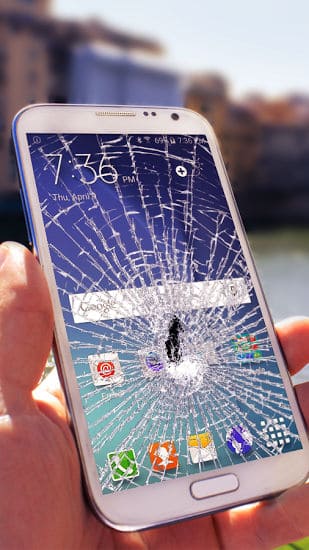
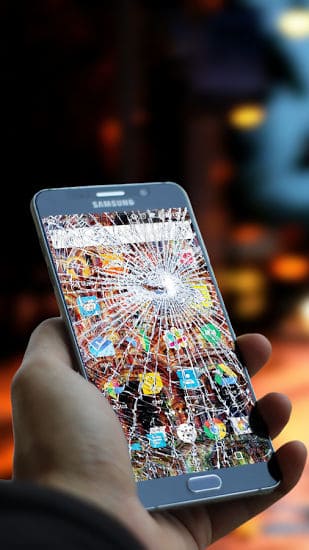
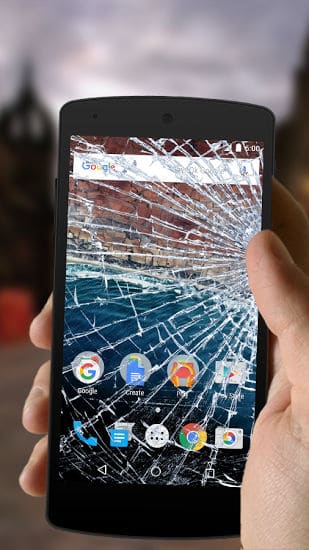
| Posted: 10 Nov 2016 09:42 PM PST  Broken Screen Prank APKေဘာ္ဒါေတြကိုေျပာင္ခ်င္ေနာက္ခ်င္တဲ႔ေဘာ္ေဘာ္ေတြအတြက္မိမPhone Screen ကိုတို႔ထိလိုက္ယံုနဲ႔မွန္ေတြကြဲကုန္မယ္ထင္ရမွာ။အရမ္းလန္းတယ္ Be noted: Broken Screen is just a prank/simulated app used for fun, it simulates the broken screen effect to play with your friends. It will not harm your phone. Broken Screen Prank is a classic funny app used to prank your friends. When you touch your phone screen, the app simulates the cracked screen and loud cracking sounds on your phone. It looks like you use your finger to break and crack your phone. The broken effect is so realistic that all your friends will believe that your phone was broken and they will be scared. App Feature: . Realistic crack wallpaper and breaking glass sound. . Crack your screen by touching or shaking. . Destroy your phone screen by other effects such as fire screen and electric screen. Size : 4.8M Current Version : 3.0 Requires Android : 2.3 and up Offered By : LosAngeles Night  Thank You !ေရာင္ျပန္ေလး(နည္းပညာ)www.yplitshare.orgအဆင္ေျပပါေစ.. ေမာင္ေပါက္< Knowledge Note > www.maungpauk.org  |
| DU Phone Cooler & Cooler Master APK Posted: 10 Nov 2016 09:38 PM PST  DU Phone Cooler & Cooler Master APK  ကၽြန္ေတာ္တို႔ေတြ Game ကစားလို႔ပဲျဖစ္ျဖစ္။တစ္ေနကုန္အသံုးျပဳေနလို႔ပဲျဖစ္ျဖစ္ဖုန္းပူလာတတ္ပါတယ္။ ဒီေကာင္ေလးကေတာ့မိမိဖုန္းအပူခ်ိန္ကိုထိန္းညွိေပးထားတာျဖစ္တဲ႔အတြက္Android ဖုန္းကိုင္ေဆာင္သူတိုင္း ေဆာင္ထားသင့္ပါတယ္ DU Phone Cooler & Cooler Master(CPU Cooler) is a temperature monitoring and controlling app that reduce your CPU usage and cool down your phone. DU Phone Cooler & Cooler Master Features (Totally Free): – Real-time Temperature Monitor Monitors your phone temperature in real time, so you can see the change from moment to moment. When the temperature is too high, DU Phone Cooler & Cooler Master(CPU Cooler) will alert you. – Overheating App Analysis Collects each app's usage of CPU, GPU, RAM, etc. and applies the DU Temp Control Engine (DTCE) algorithm to analyze the apps causing the phone to overheat. It then marks each app's heating level, so you never miss any hidden heating apps. – One-Tap To Cool Down Disables heat-producing apps with only one tap. First, you can choose any apps to keep. – Detecting Overheating Apps Base On Exact Algorithms Detects overheating apps and give list of those apps and kill them, DU Phone Cooler & Cooler Master won't miss any hidden overheating apps. – Smart Charge Display charge status in real time, accurately estimating remaining charge time. DU Phone Cooler & Cooler Master(CPU Cooler) for android in other word cool master cooling android phone and heat minimization algorithm is very effective to reduce CPU usage which ensures long battery life. Battery cooler, Extra feature is solve battery problems with battery saver mode and and extend your battery life with phone cooler. FAQ: Why does my phone overheat? Overheating can occur after prolonged use of powerful apps or games, or while running a large number of apps simultaneously, or if you happen to run a problem app that can lead to excessive hardware access. When the phone's hardware power consumption rises, it will produce enough heat that you will noticeably feel the phone overheating. What are the harmful effects of my phone overheating? Very high phone temperatures can cause your device to respond slowly or to crash or restart. Prolonged overheating can accelerate the aging process of the device itself, shortening the lifespan of your phone. More seriously, though, continued prolonged periods of overheating may lead to potential security problems. Contact: If you have any questions about DU Phone Cooler & Cooler Master(CPU Cooler) , please email us at: feedback@duapps.com. Official website>>> duapps.com Facebook page >>> facebook.com/duapps Twitter page >>>Twitter: twitter.com/duapps Size : 3.3M Requires Android : 4.0 and up Offered By : DU CPU Cooler Master  Thank You !ေရာင္ျပန္ေလး(နည္းပညာ)www.yplitshare.orgအဆင္ေျပပါေစ.. ေမာင္ေပါက္< Knowledge Note > www.maungpauk.org  |
| ဖုန္း ဘက္ထရီ သက္တမ္း ရွည္ၾကာေစဖို႔ မွန္ကန္တဲ့ အားသြင္းနည္းမ်ား Posted: 10 Nov 2016 04:35 PM PST  စမတ္ဖုန္း အသံုးျပဳသူတိုင္း ရင္ဆိုင္ေနရတဲ့ အခက္အခဲ တစ္ခုကေတာ့ ဖုန္း ဘက္ထရီ သက္တမ္းပဲ ျဖစ္ပါတယ္။ တစ္ခုခုကို စိတ္၀င္တစား အသံုးျပဳေနရင္း ဖုန္း ဘက္ထရီ ကုန္သြားလို႔ စိတ္ပ်က္ေနရမႈေတြကို ေျဖရွင္းဖို႔အတြက္ ဖုန္းဘက္ထရီရဲ ႔ အသက္ ကို ငဲ့ညွာရပါလိမ့္မယ္။  Battery University က ေျပာျပခဲ့တဲ့ သင့္ စမတ္ဖုန္းကို အားသြင္းသင့္တဲ့ နည္းလမ္းေတြကေတာ့ - သင့္ဖုန္းဟာ အားျပည့္ေအာင္သြင္းၿပီးေနၿပီဆိုရင္ အားသြင္းစက္ကေန ဖယ္ရွားလိုက္ပါ။ အားျပည့္ၿပီးသားကို ဆက္ၿပီး အားသြင္းေနျခင္းဟာ ဘက္ထရီရဲ ႔ အသက္ကို ထိခိုက္ေစပါတယ္။ - ေနာက္တစ္ခုကေတာ့ သင့္ဖုန္းကို ၁၀၀ ရာခိုင္ႏႈန္း အားျပည့္ေနေအာင္ အားမသြင္းထားပါနဲ႔။ ဗို႔အားျမင့္မားမႈဟာ ဘက္ထရီကို ဖိအားတစ္ခုျဖစ္ေစႏိုင္တာေၾကာင့္ပါ။ - ဖုန္းအားသြင္းတဲ့အခ်ိန္မွာ အားသြင္းစက္နဲ႔ ဖုန္းတို႔ဟာ အပူခ်ိန္လြန္ကဲေနလို႔မရပါဘူး။ အပူခ်ိန္ ၊ အေအးခ်ိန္ တို႔လြန္ကဲျခင္းဟာ ဖုန္းဘက္ထရီရဲ ႔ အားသြင္းႏိုင္စြမ္းကို ေလ်ာ့က်ေစပါတယ္။ - ဖုန္းအားသြင္းခ်ိန္ကို အၾကာႀကီးမထားပါနဲ႔။ တစ္ေနကုန္ ခဏခဏ သြင္းတာက ပိုေကာင္းပါတယ္။ သုေတသီေတြေျပာျပခဲ့ဖူးတာက ဖုန္းဘက္ထရီ သက္တမ္း ၁၀ ရာခိုင္ႏႈန္းေလာက္ ေလ်ာ့က်သြားတိုင္း အားျပန္သြင္းေပးတာ ဘက္ထရီကို ၾကာရွည္ခံေစတယ္လို႔ ဆိုခဲ့ဖူးပါတယ္။ ဖုန္းအား ကို ၾကာရွည္ခံေစဖို႔အျခားလုပ္ႏိုင္မယ့္ အရာေတြကေတာ့ notification ၊ location ၊ Wi-Fi နဲ႔ အလိုေလ်ာက္ ေဒါင္းလုဒ္ ျပဳလုပ္မႈေတြကို ရပ္နားထားဖို႔ပဲ ျဖစ္ပါတယ္။ ေနာက္တစ္ခုကေတာ့ အက္ပလီေကးရွင္းတစ္ခုကို သံုးၿပီးတိုင္း Close ျပန္လုပ္ပါ။ ဥပမာ - သင္ဟာ Facebook အက္ပလီေကးရွင္းကေန Log Out ျပဳလုပ္လိုက္ရံုနဲ႔ အဲဒီ အက္ပလီေကးရွင္းဟာ ဖုန္းရဲ ႔ လုပ္ေဆာင္ခ်က္ထဲက မထြက္သြားေသးပါဘူး။ Background မွာ ဆက္ၿပီး လုပ္ေဆာင္ေနပါတယ္။ အဲဒါေၾကာင့္ အက္ပလီေကးရွင္းတစ္ခုကို အသံုးျပဳၿပီးတိုင္း အၿပီးသတ္ ပိတ္လိုက္ဖို႔ ႀကိဳးစား့ပါ။ Ref:starpulse http://www.trend.com.mm/ အဆင္ေျပပါေစ.. ေမာင္ေပါက္< Knowledge Note > www.maungpauk.org  |
| You are subscribed to email updates from ေမာင္ေပါက္ ( Maung Pauk ). To stop receiving these emails, you may unsubscribe now. | Email delivery powered by Google |
| Google Inc., 1600 Amphitheatre Parkway, Mountain View, CA 94043, United States | |


0 comments:
Post a Comment